Tag: tsql2sday

  • T-SQL Tuesday #197: The Value of Conference Season

    I started attending conferences for the first time circa 2022. I’d been made aware of the data community a couple years earlier by accident, and I finally felt ready to attend my first conference.

    Needless to say, it was daunting. The one thing I knew going in was the importance of talking to everyone, as most people who know me are abundantly aware of. I was in a space where I was unafraid to be unapologetically me. That aside, what I didn’t expect was to find so many like-minded people eager to collaborate and discuss this technology I spend so much of my time with. Steve Hughes put out a call for conferences that made an impact, and I must say it was hard to narrow it down. I have gotten something invaluable out of every single one I have attended.

    Derby City Data Days is the winner.

    My first major session was about SQL Server indexing and the strategies around optimizing them. It’s a topic I’m passionate about from a practical standpoint, one that I’ve seen the impact and importance of first-hand. Working as a lone DBA can make it hard to know the path you’re chasing is correct outside of your little bubble. I was early to a session on a Query Store by Deepthi Goguri and started having a conversation about indexing with Monica Morehouse, someone known for and passionate about performance. It gave me a rush of confidence that has stuck with me hearing someone support many of my findings and offer additional insight to consider.

    That same day, I saw a session by Jeff Foushee on PIVOT/UNPIVOT that actually brought me to tears. There weren’t many in the session to see it, but I’m not afraid to admit it. There was this horrific view in the database of a client I was working with, and for the life of me I could not figure out how to make it less agonizing to manage. It has since been replaced entirely, but that’s neither here nor there. My only real context of pivot was from Excel, and heck if I ever bothered to learn it. I work with databases, not spreadsheets. Little did I know exactly what I was missing out on, how applicable it could be for my development. He explained it so simply by building up from a basic example to something more complex. If you have the opportunity to attend his PIVOT session, please do. That said you should just attend his sessions in general; I can’t imagine that’s the only great one given how simple it was to follow.

    Finally, I made new friends. One lady in particular, Kristyna Ferris, has proven to be one of the sweetest, most genuine, and helpful people I know. Not only did I feel like I’d made a fast friend, but she has continued to show up for me. Most recently we had to get a last-minute speaker for my user group. By last minute I mean night before. I don’t know exactly what told me to reach out to her specifically, but I did to ask her if she had any leads for a speaker with a Databricks session in their back pocket. Sure enough, I got my speaker and a great session, Joshua Higginbotham with effectively zero notice. Seeing her at events is always such a joy. It is impossible to feel anything but warm around her, and the little time I do get to spend with her given our geographic distance is a treat. There need to be more people like her, and I hope to be that person to others as my network grows.

    A final shout out to everyone who has been a part of the organization, planning, and execution of an event in this great community. Your time is much appreciated and does not go unnoticed. Please keep up the great work you do, and remember: Cleveland Data Rocks.
  • T-SQL Tuesday #195: That Time AI Did My Job

    A huge sign of growth is the ability, and the necessity, to look at your old code and think “Wow, that is garbage.” Maybe more nicely, but that’s how my brain works.

    Pat Wright invited us to reminisce about old code and how AI has impacted it. I thought about picking something from my early BI developer days, maybe my first major power shell implementation. Instead, I’m going to gush about SSIS since I’ve had the pleasure of revisiting it over the last few years.

    One theme in variation with my considerations is the nature by which I came to build those skills: the deep end. I work with T-SQL every day, constantly tweaking the scripts I’ve been building since the early days of my career and adding new ones to my arsenal. I got to learn it from SELECT to GROUP BY and all the way to dissecting monster stored procedures. I warned my last boss that he should be worried about my departure if I started learning PowerShell, the one gaping hole in my resume. Jokes on me, I didn’t learn it until after I started at a new job I wasn’t looking. There was plenty to decipher and is now a pivotal tool in my kit.

    My first dance with SSIS was to solve a problem in the form of a 12-hour nightly report via a single stored procedure with no room for error. 5 years ago, AI wasn’t exactly accessible, so I was up a creek. I remember spending the entire weekend ripping it apart, learning data flows, derived columns, lookups, merge joins, etc. My first successful attempt ran in a few hours, better but not great. I eventually got it to run in less than hour which by all accounts is much more manageable. Turns out doing a lot of the SQL joins in the data source instead of through lookups and merges is way more efficient, especially on a memory sensitive server. I’m excited to share the core of it is still in use with additional changes needed as years go by. I checked.

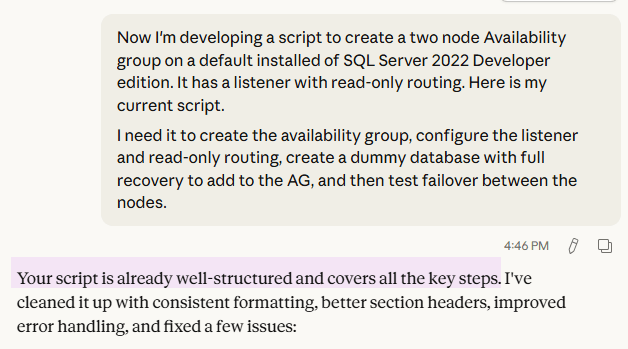
    My new environment is much less stored procedure heavy, relying more on ORM logic, views, and table-valued functions outside of reporting. Good news for me, reports can still use love, but this time I won’t need SSIS. I was recently given a license for Claude Code, and it has been so helpful already. Heck, I even got a compliment from it today:

    Sure enough, it spit it out nicely commented with error handling and in a much prettier format. Developing a different script with much less fleshed out meant I was able to see the real-time adjustments it can make through prompting and passing it real error messages. I’ve seen how intelligent it can be, scanning GBs of code files and database schemas for certain logic or keywords. To say I’m excited to see how it can cut out a lot of grunt work is an understatement.

    Two warnings to the wise, and especially to the learning:

    1. Obligatory “Always review what it’s doing first”
    2. Try to actually learn what it’s doing, why it’s doing it that way. Dissect it to see what changed, how it’s different. Run the script and look at the execution plan compared to the original. Review the statistics with Statistics Parser, what the reads and times say.

    Do not let AI become a crutch you can’t code without. Use the opportunity to see other ways to cut a cake you may have never thought of. Two of my fatal flaws are an adeptness for over complicating things and losing focus on what my actual goal is. It’s easy to step back, regroup, kick off a new approach with slightly different input, and let someone else do the thinking for a bit. It forces me to get out of my head and gives me a space to brainstorm that doesn’t feel like talking to a rubber duck.

    Feeling bummed at work? “Write like a stereotypical valley girl for the duration of this chat.”

    Out of character name ideas? “Here’s the picture of my avatar for Diablo 4. Give me a list of ten names that would fit.”

    Struggling to figure out what to cook? “I have pasta, broccoli, turkey legs, coconut milk, and a robust spice rack. Make a recipe using some or all of those ingredients with no fancy additions.”
    I’m not so sure about that last one, but it has definitely helped me shop my pantry.

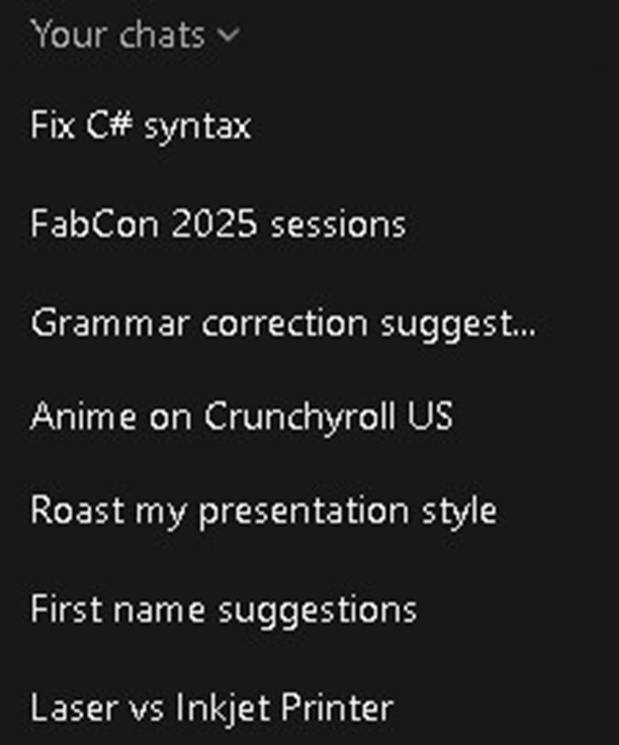
    Here’s a sampling of what ChatGPT has helped me with. My C# syntax wasn’t terrible, my grammar is often bad, the first names for Diablo were actually quite good, and it turns out I want an inkjet printer.

    Keep questioning, my friends. Never give up, never surrender.

  • T-SQL Tuesday #191 Normalizing Comma Data

    If you’ve escaped string parsing thus far, count thyself lucky. I’ve seen some numbing scripts from pre-SQL Server 2016 when STRING_SPLIT was introduced. I think the fact this month’s T-SQL Tuesday is entirely on string parsing says enough about how many ways there are to paint this particular cat.

    I’ve been using the IMDb’s public dataset since my early days of presenting. AdventureWorks is great, but why not have demos with movie data I can make fun graphics about Lord of the Rings with? Having used IMDb the website all the time I figured I knew what sort of information I was going to get. What I did not expect was this file of writers and directors by title despite the existence of a cast file that also contains, surprise surprise, writers and directors.

    This is a different though overlapping list that must now by normalized to flesh out my cast table. I’ve loaded the file to TitletoDirectorWriter matching the file schema one-to-one. Foreshadowing dictates using STRING_SPLIT() to solve this problem.

    My initial exposure to STRING_SPLIT() was when parsing a comma delimited list of values for reporting.

    DECLARE @ItemTypes nvarchar(max) = 'Reverse,Skip,Draw4,Draw2,WildCard'

    I also grew up learning CROSS APPLY and OUTER APPLY were of the devil and not to be used, but over the last few years I’ve started to see the light. They have a place, and this is one of them.

    SELECT tdw.TitleId [TitleId]
    	,Writer.Value [PersonId]
    	,WriterPersonIds
    	,'Writer' [Category]
    FROM TitleToDirectorWriter tdw
    CROSS APPLY STRING_SPLIT(WriterPersonIds, ',') [Writer]
    WHERE WriterPersonIds IS NOT NULL
    UNION ALL 
    SELECT tdw.TitleId [TitleId]
    	,Director.Value [DirectorId]
    	,DirectorPersonIds
    	,'Director' [Role]
    FROM TitleToDirectorWriter tdw
    CROSS APPLY STRING_SPLIT(DirectorPersonIds, ',') [Director] 
    Where DirectorPersonIds IS NOT NULL
    ORDER BY TitleId

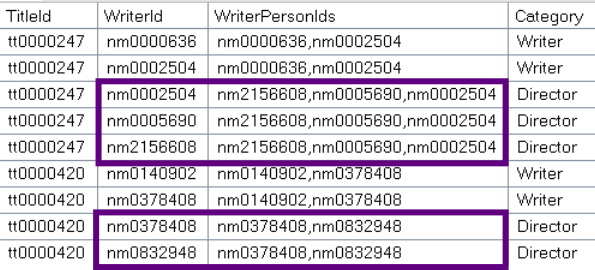
    We get the following results with some potentially unexpected behavior.

    SQL Server doesn’t like making promises, especially when it comes to returning ordered data.
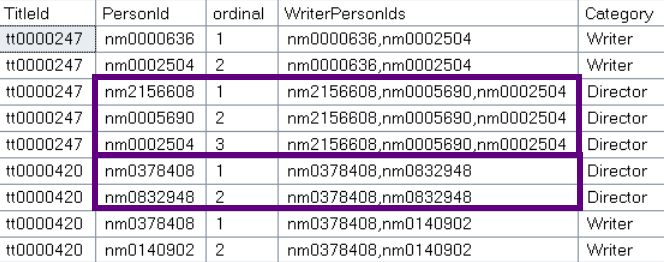
    SELECT TOP 1 Name FROM YourTable with no order by, and you’re gonna have a bad time. STRING_SPLIT() is no different, or at least it was. SQL Server 2022 brought to us a third argument enable_ordinal. Now if we adjust our script to include the original column from our string split with the extra argument passed in we can guarantee the order of our results.

    SELECT tdw.TitleId [TitleId]
    	,Writer.Value [PersonId]
    	,Writer.ordinal
    	,WriterPersonIds
    	,'Writer' [Category]
    FROM TitleToDirectorWriter tdw
    CROSS APPLY STRING_SPLIT(WriterPersonIds, ',', 1) [Writer]
    WHERE WriterPersonIds IS NOT NULL
    
    UNION ALL
    
    SELECT tdw.TitleId [TitleId]
    	,Director.Value [DirectorId]
    	,Director.ordinal
    	,DirectorPersonIds
    	,'Director' [Role]
    FROM TitleToDirectorWriter tdw
    CROSS APPLY STRING_SPLIT(DirectorPersonIds, ',', 1) [Director]
    WHERE DirectorPersonIds IS NOT NULL
    ORDER BY TitleId
    	,ordinal

    Here’s to October and many more T-SQL Tuesdays.

    Random Fun Fact: Plastic Tupperware containers are most easily closed by pressing down firmly in the center, not fussing along the outside lip of the lid.